
A bit of a change in direction today and a break from the usual travelogue …
Daily Photo – Lan Yuan
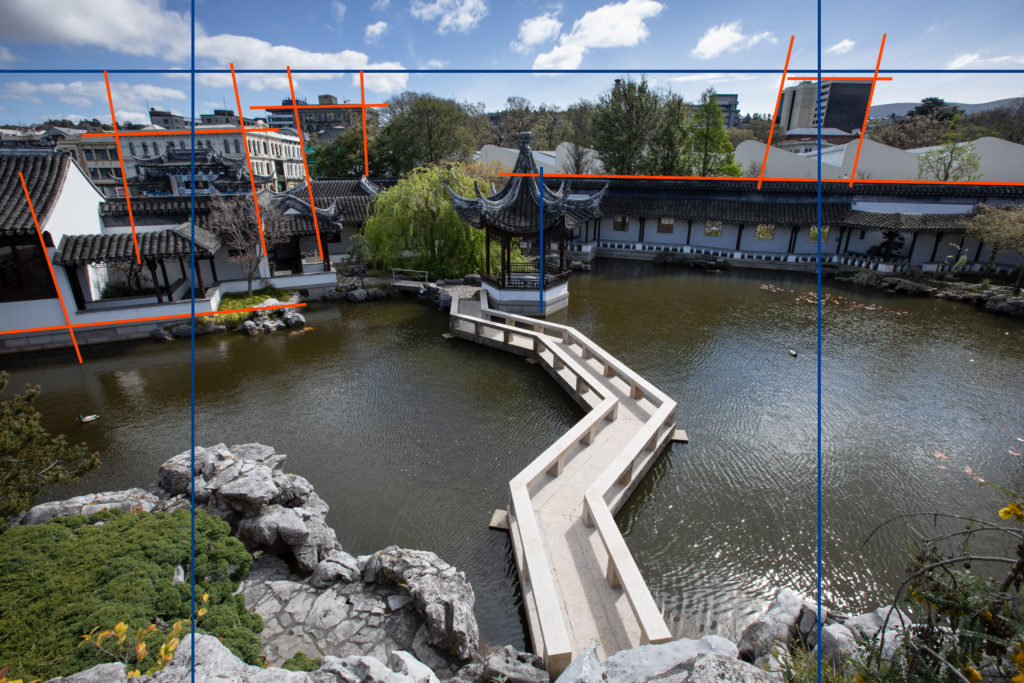

Why This “Quiet” Photo Was a Technical Battle
Every now and then, you take a photo that looks like it should be the easiest thing in the world. It’s a beautiful scene, some tranquil garden, maybe, or a quiet street. You look at the raw file (that top image, the one with all the orange marks) and think, lovely. You look at the final image (the bottom one), and you think, perfect.
But what’s the distance between lovely and perfect? That’s where the work sits. And in a photo like this, that work is all down to one of the most stubborn issues a photographer faces when shooting architecture: converging verticals.
The Problem with the Real World
The buildings in this shot that surround the Dunedin Chinese Gardens are meant to stand upright, proud, and square. But because of the lens, the height and the angle the camera lens did what it does best: it lied.
If you look closely at the raw file, you can see how those vertical lines, the edges of the walls, the pillars, the windows are all leaning into the centre. They look like they’re about to fall over, or maybe they just had a long night. It’s that classic “keystone” effect, and it immediately breaks the serene feeling of the place.
Now, this isn’t just one building. This is a complex arrangement of walls and corners, all at slightly different distances and angles. It’s a technical nightmare in the editing suite because correcting one set of lines perfectly often makes the adjacent set of lines look completely warped. It’s like trying to untangle one knot on a fishing line only to find you’ve created three more.
The Grunt Work in the Post-Processing Darkroom
There’s no magic button for this. Getting from that leaning, slightly chaotic raw file to the balanced, final image was a process of very fine adjustments, the kind that requires a cup of coffee and a lot of quiet concentration.
I had to put on my architect’s hat and methodically tackle the geometry:
Transform Tool, Not Magic: This involved manually adjusting the perspective and vertical guides both Lightroom and Photoshop. I wasn’t just pulling a slider; I was nudging it, checking the highlighted lines (the ones I’ve marked in orange), nudging again, checking the opposite side, and then nudging again until the eye accepted the view as naturally straight.
Fighting the Stretch: When you correct converging lines, you stretch the image. You have to be mindful that the proportions of the elements, the windows, the roof overhangs don’t become too tall or too thin. It’s a constant trade-off between straight lines and believable shapes.
The Final Layers: Only once the structure was sound and once the buildings looked like they were firmly anchored and not listing like a rusty ship could I move on to the easier, more enjoyable work of bringing the whole scene to life.
In the end, what looks like a simple, polished photograph is really a technical triumph over the lens’s distortions. It’s proof that sometimes, the most peaceful scenes are the ones that demand the most time and technical fussing to get right.
It’s that quiet satisfaction, the one you get from fixing a complex problem without leaving a trace of the effort, that makes the whole process worthwhile. It’s also a reminder to work slowly, and look carefully.
I’d love to hear your thoughts. Has anyone else had a deceptively difficult image like this? Share your perspective battles below.




